
Make better podcast and livestream sound — WTAUTOMIXER & DaVinci Resolve Fairlight
· Audio · Post-production & software · 17:33
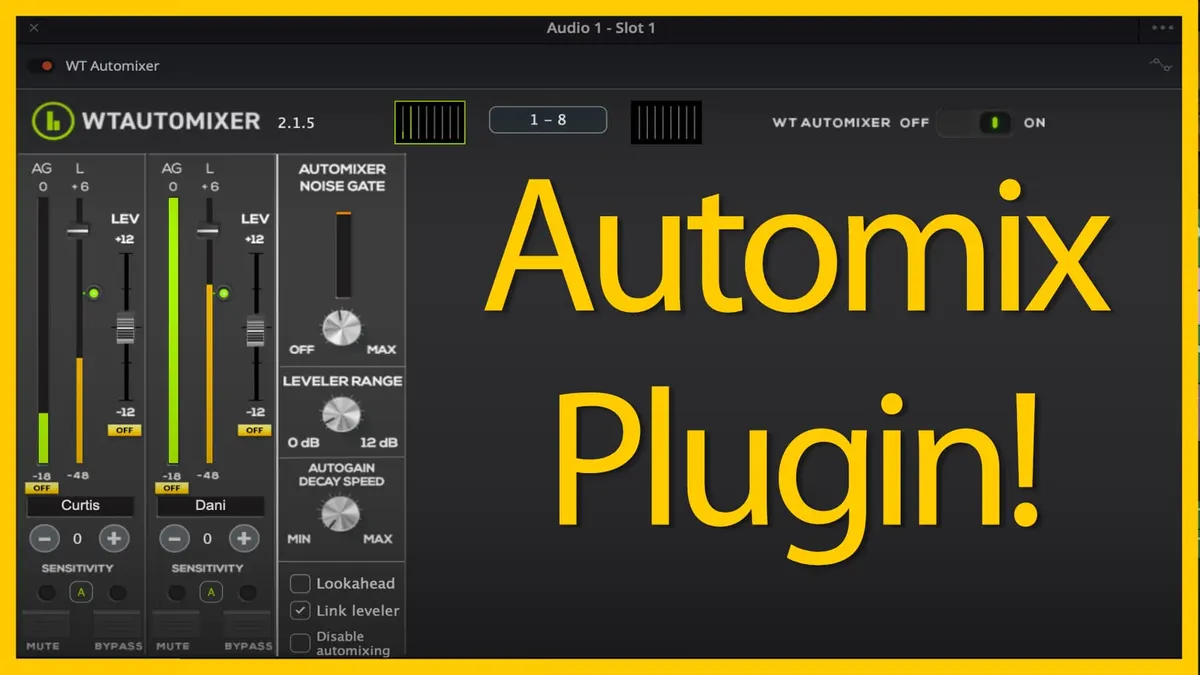
Do you find that your podcasts or livestreams, which you record with 2 or more people, sound noisy and…just not that great? The reason they sound that way is that recording with two or more microphones in the same space often results in microphone bleed and more pickup of room noise. There are a few different ways to solve this problem and get cleaner sound, but the quickest way is to use an auto mixer. In this video, we cover a VST, AU, AAX plugin automixer you can use in your DAW audio app or livestream encoder app to make much cleaner, focused sound. WTAUTOMIXER is the plugin that combines an automatic mixer, leveler, and noise gate into a single, easy-to-use plugin. Let’s take a closer look at WTAUTOMIXER in DaVinci Resolve Fairlight.
FULL DISCLOSURE — WAVETOOL gave me a free license of WTAUTOMIXER. They have not paid me further, told me what to say, and they have not reviewed this video prior to posting.
You can find WTAUTOMIXER over at https://www.wtautomixer.com
Gear used or mentioned
The links below are Amazon, B&H Photo, Sweetwater, or other affiliate links. As an affiliate, I earn from qualifying purchases.
- Earthworks ETHOS microphone — B&H, Sweetwater, Amazon
- Sound Devices MixPre audio recorder — B&H, Sweetwater, Amazon
- Sennheiser MKH50 microphone — B&H, Sweetwater, Amazon
- Impact Turtle-Base C-Stands — B&H, Amazon
- Aputure LS 600x Pro Bicolor LED Light — Aputure, B&H, Amazon
- Aputure Light Dome III Softbox — Aputure, B&H
- Amaran 300c RGBWW Single-Point LED Light
- Amaran Spotlight SE — Aputure, B&H, Amazon
- Rosco Prismatic Glass Gobo in Cool Lavender — B&H
- Canon C70 Cinema Camera — B&H
- Canon RF 24-70 f/2.8 lens — B&H, Amazon
- Panasonic GH5 camera — B&H, Amazon
- Panasonic 12-35mm f/2.8 II lens — B&H, Amazon
Read the transcript
If multi-person podcast recordings sound noisy, the culprit is often microphone bleed — each person’s voice getting picked up faintly by everyone else’s open microphone — compounded by every open mic also capturing more of the room’s ambient noise. The traditional fixes are manually riding faders live (pulling down mics that aren’t currently speaking) or tediously cutting out silent/bleed sections in post, which can take 90+ minutes for an hour-long episode.
A better middle ground is an auto-mixer. High-end field recorders (Sound Devices MixPre, Zoom F6/F8 series) and pro mixing boards have this built in, but it’s also available as a plugin for your DAW or streaming software. This episode demonstrates WT AutoMixer by Wavemark (a license was provided to me for this review; I first tried an earlier v1 back in 2021 and wasn’t impressed, but v2 is genuinely good now). It’s a VST3/AU/AAX plugin working in Pro Tools, Logic, Reaper, and DaVinci Resolve Fairlight (not in NLE video editors like Premiere/Final Cut, since it needs multi-channel cross-track communication), on macOS and Windows, with just 2.67ms of latency — low enough for live streaming.
WT AutoMixer combines automated gain riding (shifting emphasis to whoever’s currently talking and reducing others), a built-in leveler to smooth out dynamic swings in someone’s speaking volume, and a noise gate. Demonstrated on a two-person podcast recorded in an untreated, reverberant room with a dishwasher and fridge running in the background: dropping the plugin on each track (must be enabled on every track, since it needs to talk between them) and naming the tracks, the automated gain control audibly cleans things up even on just two mics — with three or four mics the effect becomes far more dramatic. The leveler meter shows green when boosting a quiet moment and red when pulling down a loud one. Sensitivity can be adjusted up to 12 if the auto-mix isn’t reacting quickly enough for certain voices, or down if it’s triggering too eagerly; up to three separate mixing groups are supported for larger casts.
The noise gate uses a threshold (e.g., -42dB) below which it further attenuates audio, with an adjustable amount of attenuation — pushed to its max of 12dB it starts audibly clipping words between phrases, so something closer to 3dB is more natural; use your ears. An auto-gain decay speed control adjusts how quickly a track fades back down after someone stops talking — zero seconds drops very fast (can sound abrupt), while the max setting fades slowly and sounds more natural at the cost of slightly more bleed/noise. It also supports ducking a music track by assigning it to a special “X” group so it automatically fades under dialogue.
WT AutoMixer offers a 7-day free trial and costs $160 US. If you’re recording casually on a tight budget, the manual/tedious techniques are a reasonable substitute; but if you produce content regularly and your time is worth more than that price, it’s a worthwhile investment given how much post-production cleanup it saves, especially as you add more people to a recording. Get out there and make some great sound. Talk soon.